


Don’t let your California Guard Card catch you off guard.
If you’re working as a security guard in California, you’re already familiar with the Guard Card training process.
But it’s not a one-and-done situation, and you’ll need to renew your card to stay compliant with California regulations.
Renewing it is something a lot of guards don’t think about until the window is closer than they’d like, and by that point, scrambling to confirm CE hours, update personal details, and submit everything on time is a lot more stressful than it needs to be.
This guide covers everything you need to know to renew your California Guard Card if it expires in 2026, including what’s required, what it costs, and how to get it done without any gaps in your ability to work.
How Often Do I Need to Renew My Guard Card?
Your California Guard Card is valid for two years from the date of issue. Once that time is up, you’ll need to renew it through the Bureau of Security and Investigative Services (BSIS) to be legally eligible to continue working as a security guard.
The renewal window opens 90 days before your card expires, giving you plenty of time to prepare.
BSIS recommends submitting your renewal about 60 days before the expiration date to prevent processing delays and avoid any gap in your ability to work.
We do suggest setting a calendar reminder the moment you receive your new card, as two years goes faster than you’d think, and if you need to chase down any missing documents, you might find yourself wishing you’d started a lot earlier.
Guard Card Renewal Requirements
Before you renew your California Guard Card, you need to make sure your continuing education (CE) training is up to date.
Within the first year after you registered your guard card, you need to complete:
- 16 hours of training within the first 30 days of receiving your Guard Card.
- 16 hours of training within the next six months.
That’s 32 hours in your first year. Every year after, you must complete 8 hours of refresher training to keep your registration active.
The requirements themselves aren’t the problem, but tracking the paperwork is. We see a lot of guards who completed their training on time but can’t locate the certificates when renewal comes around.
Your training provider should be able to reissue them, but that takes time you may not have if you’re already close to your expiration date. Keep those certificates somewhere you’ll actually find them
Guard Training Tip: Keep all your training certificates organized and easily accessible, as you’ll need to certify that you’ve completed the required CE hours when submitting your renewal.

Before You Submit Your Renewal
Make sure all your personal and licensing details are up to date:
- Verify your license number, expiration date, and CE completion.
- Review your address on file with BSIS. If you’ve moved, you’ll need to update your information to keep your records accurate.
One of the most common mistakes we see is guards assuming their address is current because they updated it with their employer. BSIS is a separate system, and the two don’t talk to each other. If BSIS has an old address on file, your physical card gets mailed to the wrong place, and you’ll be left wondering where it is.
Incomplete or unsigned applications are marked as deficient, which can cause processing delays and temporarily prevent you from performing security duties.
Guard Card Renewal Costs
If you renew before your card expires, the standard renewal fee is $44.
If you miss the expiration date, you can still renew within 60 days after your card expires, but you’ll pay the standard $44 renewal fee plus a $25 delinquency fee, bringing the total to $69. It’s not a devastating amount, but it’s an entirely avoidable one.
How to Renew Your Guard Card Online or by Mail
Renewing your California Guard Card can be done online through BreEZe or by mail.
Online is the better option for most people, since you get confirmation immediately, and you can print a temporary card the same day your renewal is approved.
Mail renewal works fine, but you’re adding days or weeks of transit time and a lot more waiting around without knowing where things stand. Unless you have a specific reason to go the paper route, BreEZe is the way to go.
Renewing Online Through BreEZe
BreEZe lives up to its name, and renewing online is the quickest and most straightforward option available:
1. Create or log in to your BreEZe account
Visit the BreEZe portal and log in using the account you created when you signed up for your Guard Card. The portal is really easy to navigate through, so just follow the prompts and you’ll find your way around without any trouble.
If you don’t already have an account, register as a new user using your existing Guard Card.
2. Navigate to the Renewal Section
You’ll see a tab informing you that it’s time to renew.
Follow the step-by-step prompts, and you’ll be brought to a section where you can enter your personal information, such as your contact details, military status, guard registration number, and address.
3. Upload CE Certification
You’ll be asked to update your training certificate as proof that you’ve completed all the required training. If you don’t have this certification, contact your training provider.
4. Complete the Online Application
Finally, you’ll need to enter your payment details to cover the renewal fee.
Carefully review all the information you’ve provided in your online application before submitting it.
Once BSIS approves your renewal, you can print a temporary copy of your Guard Card directly from the BreEZe portal. You should carry this printout along with a valid photo ID while waiting for your physical card to arrive in the mail.
Renewing by Mail
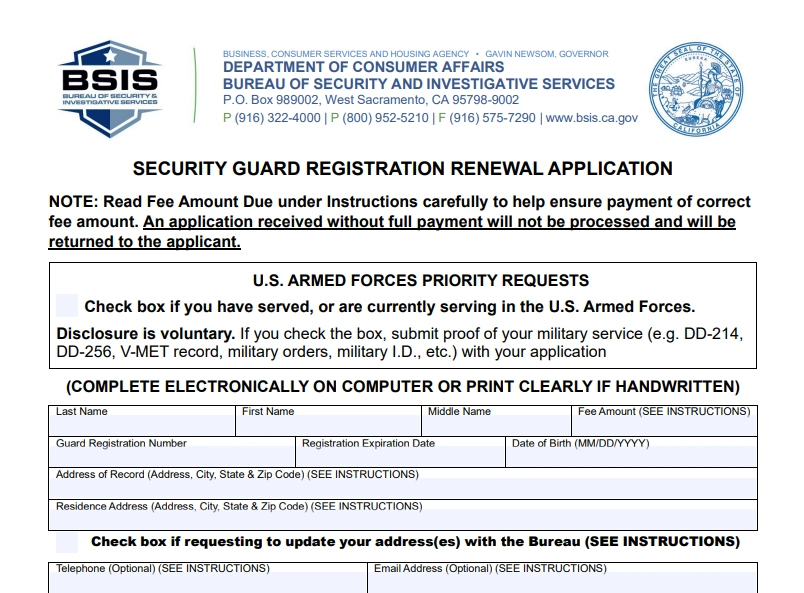
If you’d prefer, you can complete and send a physical form to renew your Guard Card.
1. Download and Print the Renewal Form
Start by downloading and printing the most recent BSIS Security Guard Renewal Application from the BSIS website.
Check the date and make sure you’re using the latest form. BSIS updates these periodically, and outdated versions may be rejected, slowing your renewal process.
2. Complete the Form
Fill out all required fields, including your full name, Guard Card number, date of birth, address, and contact information.
You need to sign the form to confirm that you’ve completed all required continuing education.
3. Include Payment
You can pay your renewal fee by mail with a check or money order made out to the Bureau of Security and Investigative Services. Do not send cash through the mail.
Remember to double-check the amount on the check. BSIS receives your form without the correct fee, the whole application gets returned, and you’re back to square one
4. Mail Your Application
Send your completed application and payment to:
Bureau of Security and Investigative Services
P.O. Box 989002
West Sacramento
CA 95798-9002
It’s best to mail your renewal 60 – 90 days before your card expires. Applications mailed too early (more than 90 days before expiration) may be returned.
Finally, keep a copy of your completed application and payment receipt for your records. It takes thirty seconds to scan or photograph, and you’ll be glad you did it if you ever need it.
What If My Guard Card Expires?
If your Guard Card expires, you cannot legally work as a security guard in California.
Even if your employer allows you to stay on post, both you and the company could face legal consequences.
BSIS does provide a 60-day grace period after your expiration date, during which you can still submit a renewal application. Your license is technically inactive during this window, but if your renewal is approved within those 60 days, you’re reinstated and can get back to work.
If more than 60 days pass without renewal, your license is canceled.
What isn’t as easily recoverable is letting it go past 60 days. At that point, your license is canceled, late renewal is no longer an option, and you’re looking at starting the entire application process over to obtain a new Guard Card.
That means completing the Power to Arrest training again, submitting fingerprints for DOJ/FBI background checks, and paying the required application fee.

What Happens After I Submit My Renewal?
Once you submit your Guard Card renewal, BSIS begins processing your application.
If everything is in order, your renewal will be approved within approximately 60 days, though it can move faster, so it’s worth checking your BreEZe account every now and then to see your application’s status.
If you have any criminal convictions or other issues that could affect your eligibility, BSIS may reach out asking for additional information or supporting documents. This doesn’t automatically mean your renewal won’t be approved, but you may need to take some extra action.
Once your new Guard Card arrives in the mail, your renewal is complete, and you can keep working legally as a security guard. (Now would be the time to go ahead and set that two-year reminder while it’s fresh in your mind)
Avoid Issues When Renewing Your Guard Card
The renewal process is more straightforward than many guards expect. BreEZe has improved over the years, and online renewal is fairly quick once everything is in order. The cases where it becomes stressful are almost always when someone is not prepared or even forgets they have to renew at all.
The easiest way to avoid late fees or interruptions to your work is to keep track of your Guard Card expiration date.
Mark it on your calendar or set a reminder on your phone to make sure you have plenty of time to complete your required steps without rushing at the last minute.
On the CE side, don’t leave it until the renewal window opens. It’s best to start this training early to help you continue the renewal process without any delays.
That’s all there is to the BSIS Guard Card renewal process. Once you’ve gone through it once, it gets easier each time, as you’ll know what to expect.
If you want to make the most of the two years between renewals, take a look at the online courses we offer at GuardTraining. The CE requirements cover the minimum you need to stay compliant, but the guards who stand out tend to be the ones who didn’t stop there and choose to continue learning in their free time. You never know when that extra knowledge will pay off.
FAQs About Guard Card Renewal
Still have questions? Check out our full California Guard Card FAQ guide, or see if we’ve already covered your question below:
Can I work while my renewal is pending?
You can only continue to work legally in California if your Guard Card has not yet expired. Once it expires, you cannot work as a security guard until your renewal is approved.
If you renew before your expiration date, you can use a printed copy of your approved registration along with a valid photo ID while you wait for your physical card to arrive.
Can I submit my renewal more than 90 days before my expiration?
No. BSIS only accepts renewal applications submitted within 90 days before your Guard Card expires. Applications sent earlier will be returned.
How do I replace a lost or stolen Guard Card?
If your Guard Card is lost, stolen, or damaged, you can request a replacement online through BreEZe or by mail. You will need to pay a fee of $25 to receive a new card.
Do I need to take an exam to renew my Guard Card?
No, you don’t need to take an exam to renew. You only need to complete the 32 hours of required training.
How do I verify that my renewal was approved?
You can confirm your renewed registration by logging into your BreEZe account.
You may also check your renewal status on the Department of Consumer Affairs’ License Search website.
